A Professional's Take on the New Inzone M9
The landscape of professional-grade gaming monitors has shifted dramatically in recent years. While the market was once defined strictly by refresh rates and response times, the modern professional—be they a competitive player, a content creator, or a remote-working executive who moonlights as a gamer—is now looking for a more holistic display. Enter the Inzone M9, a flagship offering that aims to bridge the gap between high-performance gaming hardware and the high-fidelity visual standards typically reserved for creative professionals. For those who have followed the history of display technology, the M9 represents a significant moment: a specialized peripheral that leverages decades of engineering expertise in the television sector and applies it to the intimate, high-speed environment of the desktop setup.
A professional’s perspective on hardware often prioritizes reliability, color accuracy, and functional design over flashy aesthetics. The Inzone M9 seeks to satisfy these requirements by focusing on Full Array Local Dimming (FALD), 4K resolution, and a high refresh rate, all within a 27-inch form factor that is widely considered the "sweet spot" for ergonomic viewing. However, the true value of any piece of equipment is found in how it handles the rigors of multi-tasking and specialized workflows. Whether one is analyzing frame-by-frame data in a video editing suite or maintaining a competitive edge in a fast-paced shooter, the hardware must disappear, leaving only the interface between the user and their objective. This analysis explores whether the M9 achieves that level of transparency and professional utility.
Advanced Display Infrastructure and Visual Fidelity
At the heart of the Inzone M9 sits a 27-inch IPS panel that manages to balance resolution and speed with surprising grace. For the professional user, 4K resolution on a 27-inch screen translates to a high pixel density (roughly 163 pixels per inch), which is essential for text clarity and detailed image inspection. In a productivity context, this means crisp spreadsheets, legible code, and sharp UI elements that reduce eye strain during long working sessions. In a gaming context, it provides a level of immersion and clarity that makes identifying distant targets or subtle environmental textures significantly easier.
However, the standout feature that separates the M9 from its mid-range peers is the implementation of Full Array Local Dimming (FALD). Most monitors in the gaming sector utilize edge-lit backlighting, which often results in washed-out blacks and "light bleed" that can be distracting during dark scenes. The M9 employs 96 independent dimming zones. While this is not as numerous as the zones found in high-end Mini-LED displays or OLED panels, the way the M9 manages these zones is a testament to sophisticated backlighting algorithms. By dimming specific areas of the screen while keeping others bright, the monitor achieves a contrast ratio and dynamic range that significantly enhances HDR (High Dynamic Range) content. This is particularly relevant for professionals who work with media or gamers who prioritize visual atmosphere.
Color performance is another area where the Inzone M9 aligns with professional expectations. Covering over 95% of the DCI-P3 color gamut, the monitor is capable of producing vibrant, accurate colors that are vital for designers and photographers. While it may not replace a dedicated reference monitor for high-end color grading, it is certainly competent enough for web-based content creation and professional photo editing. The inclusion of VESA DisplayHDR 600 certification ensures that the peak brightness is sufficient to make highlights "pop" without losing detail in the shadows, a common pitfall for lesser HDR-capable monitors.
Performance for the Competitive Professional
Beyond the static image quality, the Inzone M9 is built for motion. With a 144Hz refresh rate and a 1ms GtG (Gray-to-Gray) response time, the display meets the baseline requirements for competitive gaming. For the professional gamer or the high-performance enthusiast, frame tracking is smooth, and motion blur is kept to a minimum. Support for NVIDIA G-SYNC and Variable Refresh Rate (VRR) through HDMI 2.1 means that screen tearing is virtually non-existent, even when hitting fluctuating frame rates in demanding 4K titles.
One aspect often overlooked by casual users but scrutinized by professionals is input lag. The M9 demonstrates exceptionally low latency, ensuring that the delay between a mouse movement and the corresponding action on screen is imperceptible. This responsiveness is critical in environments where milliseconds determine success. Furthermore, the monitor includes specific features aimed at improving the user experience during intense sessions, such as customizable picture modes that can be mapped to specific applications using the accompanying desktop software. This allows a user to automatically switch from a color-accurate "Cinema" or "Standard" mode during work hours to a "Game" mode with optimized black equalizer settings for visibility in shadows the moment a game is launched.
Structural Design and Ergonomic Utility
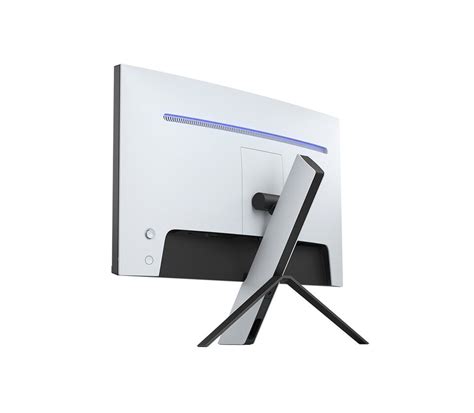
The physical design of the Inzone M9 is a departure from the traditional "gamer" aesthetic. It features a sleek, white-and-black chassis that mirrors the design language of modern high-end home consoles. The most striking element is the tripod-style stand. This design choice is polarizing but serves a functional purpose for professionals with limited desk space. The central leg of the tripod is angled, allowing the user to slide their keyboard and mouse pad closer to the monitor or even under it, which is a common practice among users who prefer a tilted keyboard orientation.
From an ergonomic standpoint, the M9 offers height and tilt adjustments. While it lacks a swivel function and the ability to rotate into a vertical orientation on the stock stand, the inclusion of a standard 100x100mm VESA mount means that professionals can easily integrate it into a multi-monitor arm setup. The cable management system is integrated into the central pillar, helping to maintain a clean workspace—a factor that shouldn't be underestimated for maintaining focus and organization in a professional setting.
Discover deals on Electronics — updated daily.
Shop Amazon →Connectivity is another area where the M9 shines. It features two HDMI 2.1 ports, a DisplayPort 1.4, and a USB-C port that supports DisplayPort Alt Mode. This makes it an excellent hub for a multi-device setup. A professional might have a powerful workstation connected via DisplayPort, a laptop connected via USB-C, and a console or secondary device via HDMI. The M9 also includes an integrated KVM (Keyboard, Video, Mouse) switch. This is a game-changer for professionals who use two computers; it allows them to control both systems using a single set of peripherals, seamlessly switching inputs without the need to unplug and replug cables.
Professional Assessment: Pros and Cons
Evaluating the Inzone M9 requires a balanced view of where it excels and where it falls short of perfection. No piece of hardware is a universal solution, and understanding these trade-offs is essential for a savvy buyer.
- Pros:
- Superior Contrast with FALD: The local dimming zones provide much deeper blacks and better highlight control than standard edge-lit displays.
- Dual-Purpose Performance: The combination of 4K resolution and a 144Hz refresh rate makes it equally viable for high-end productivity and elite gaming.
- Efficient Connectivity: The HDMI 2.1 ports and integrated KVM switch are major quality-of-life improvements for multi-device power users.
- Color Accuracy: High DCI-P3 coverage ensures that the monitor is capable of handling creative tasks with professional results.
- Integrated Software Control: The ability to adjust monitor settings via a Windows application rather than an OSD joystick saves time and frustration.
- Cons:
- Stand Mechanics: The tripod stand has a large footprint and lacks swivel and pivot options, which might necessitate an aftermarket monitor arm for some.
- Zone Count Limitations: While FALD is better than edge-lighting, 96 zones can still exhibit "blooming" or "haloing" around bright objects on very dark backgrounds.
- Average Built-in Audio: The integrated speakers are functional for notifications but lack the depth and clarity required for professional audio monitoring or immersive media consumption.
- External Power Brick: The power supply is a relatively large external brick rather than being integrated into the monitor chassis, which adds to cable clutter beneath the desk.
Comparative Analysis: Inzone M9 vs. Competitor Classes
To understand the M9's position in the market, it is helpful to compare it against common alternatives. The following table provides a snapshot of how the M9 stacks up against typical 4K IPS monitors and the emerging OLED monitor category.
| Feature | Inzone M9 (FALD IPS) | Standard 4K IPS | High-End 4K OLED |
|---|---|---|---|
| Black Levels | Good (Deep blacks with local dimming) | Average (Greyish blacks) | Perfect (Individual pixel shutoff) |
| Peak Brightness | High (600+ nits) | Moderate (350-400 nits) | Variable (Often lower sustained brightness) |
| Text Clarity | Excellent (Standard RGB subpixel) | Excellent | Fair to Good (Depends on subpixel layout) |
| Input Connections | HDMI 2.1, DP 1.4, USB-C, KVM | Usually DP 1.4 and HDMI 2.0 | Varies (Usually modern standards) |
| Risk of Burn-in | None | None | Present (Potential for static UI elements) |
| Motion Clarity | Excellent (1ms GtG) | Great (1-4ms GtG) | Superior (0.03ms GtG) |
Buying Guide: Identifying the Right User for the M9
When selecting a professional-grade display, it is important to align the monitor's strengths with your specific daily tasks. The Inzone M9 is a high-performance hybrid, but it isn't the right choice for everyone. Consider the following scenarios to determine if this display fits your workflow.
The "Day-to-Night" Professional
If your day involves six to eight hours of spreadsheet management, coding, or document review, followed by high-fidelity gaming in the evening, the M9 is arguably one of the best choices currently available. The 4K resolution provides the necessary real estate for productivity, while the FALD and 144Hz refresh rate ensure that your gaming experience isn't compromised. The absence of burn-in risk makes it a safer long-term investment for those who display static taskbars and UI elements for the majority of the day.
The Content Creator and Streamer
For those who produce video content or stream, the M9 offers a dual-monitor-in-one feel. The color accuracy allows for confident editing, and the KVM switch is invaluable for those who use a dedicated streaming PC alongside a gaming rig. Being able to toggle between inputs with a single button while keeping your desktop clean is a significant professional advantage.
The Console and PC Hybrid User
If your workstation also serves as your primary console gaming station, the HDMI 2.1 ports on the M9 are essential. They allow for 4K 120Hz output with VRR support from modern consoles, while the DisplayPort keeps your PC running at full 144Hz. This level of versatility ensures that you are getting the maximum performance out of every device connected to the screen.
When to Look Elsewhere
Conversely, if you are a "pro-sumer" who strictly plays ultra-competitive E-sports titles at 1080p to maximize frame rates above 240Hz, 4K resolution might be a hindrance rather than a help. Similarly, if you work in an environment with zero control over lighting and require a matte finish that can handle extreme glare, you should investigate the specific anti-reflective coating of the M9 to ensure it meets your needs. Finally, if you are a professional colorist working for high-budget cinema, you will likely still require a dedicated OLED or mastering monitor for final color passes, using the M9 perhaps only as a secondary UI display.
Shop the latest Electronics picks on Amazon.
See Deals →Real-World Use Cases and Maintenance
In a professional environment, longevity and ease of maintenance are paramount. The Inzone M9 is built with a sturdy plastic shell that is easy to wipe down and resistant to fingerprints. Unlike glossy screens that require constant cleaning to maintain clarity, the M9 uses a light matte anti-glare coating that effectively diffuses reflections without introducing the "graininess" often seen on older matte panels.
For those utilizing the monitor in a professional capacity, heat management is also a consideration. High-brightness FALD monitors can generate significant heat. The M9 handles this through well-placed vents on the rear of the chassis. During extended use—such as a ten-hour project deadline followed by a gaming session—the monitor remains stable and does not exhibit the thermal throttling or brightness fluctuations that can plague thinner, more compact displays.
Software support is also a critical part of the professional ecosystem. The Inzone Hub software is lightweight and allows for firmware updates that can improve local dimming algorithms or add new features over time. Professionals should always keep their hardware updated to ensure maximum compatibility with new graphics card drivers and operating system updates.
Ergonomics and Long-Term Comfort
A professional's health is often tied to their workstation setup. The 27-inch size of the M9 is ideal for maintaining a healthy viewing distance (typically 20 to 30 inches). At 4K resolution, you may find that Windows scaling at 150% or 125% provides the best balance of readability and screen real estate. The monitor’s flicker-free backlighting and low blue light modes are also worth activating if you find yourself working late into the night, as they help reduce digital eye strain.
The lack of a swivel base on the included stand is the only significant ergonomic hurdle. For a truly professional setup, it is highly recommended to pair the M9 with a gas-spring monitor arm. This allows you to position the monitor at the exact eye level required to maintain a neutral neck position, and it clears up the desk space occupied by the tripod legs. Because the M9 is relatively light for its feature set, most standard monitor arms will handle it with ease.
A Balanced Conclusion
The Inzone M9 represents a sophisticated entry into the high-end display market. It is a piece of hardware that understands the complexity of the modern professional’s life—a life that requires precision and clarity from 9 to 5, and speed and immersion after hours. By prioritizing the inclusion of FALD in a 4K IPS panel, it occupies a unique niche that provides much of the visual punch of high-end televisions with the low-latency response of a competitive gaming monitor.
While there are specialized displays that may beat it in single categories—OLEDs for pure black levels or TN panels for raw refresh speed—very few can match the M9's overall versatility. It is a tool for the multi-faceted user. For the professional who demands a clean workspace, multi-device connectivity, and a display that can handle everything from high-resolution photo editing to high-speed tactical shooters, the M9 proves itself to be a competent, thoughtful, and highly effective piece of engineering. Choosing the M9 is a decision to invest in a display that doesn't force a choice between work and play, but instead excels at both.