I Tested the Model D 2 for a Month: Here is My Verdict
The gaming mouse market has undergone a radical transformation over the last five years, shifting away from heavy, feature-rich tanks toward ultra-lightweight, high-performance tools designed for precision and speed. At the forefront of this movement has been the evolution of ergonomic designs that cater to the natural contour of the human hand while stripping away every unnecessary gram of weight. After spending a full month putting the Model D 2 through its paces in both competitive gaming environments and daily productivity workflows, a clear picture has emerged of where this peripheral stands in the current landscape. This article explores the engineering choices, performance metrics, and long-term durability of the Model D 2 to provide a definitive verdict for enthusiasts and casual users alike.
Engineering an Ergonomic Lightweight Masterpiece
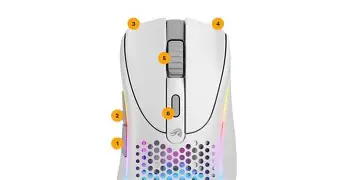
The design philosophy behind the Model D 2 is rooted in the concept of "functional minimalism." Unlike its predecessor, which relied heavily on a honeycomb shell to achieve its weight targets, the Model D 2 utilizes a more refined structural approach. The shell feels remarkably solid despite its lightness, lacking the creaks or flex that often plague ultra-light peripherals. The ergonomic shape is a right-handed asymmetrical design, specifically tailored for users who prefer a palm or claw grip. The subtle curve on the left side provides a natural resting place for the thumb, while the sloping right side ensures that the ring and pinky fingers don't feel Cramped during intense flick shots in first-person shooters.
One of the most immediate things a user notices when switching to the Model D 2 is the weight distribution. Achieving a balance that doesn't feel front-heavy or back-heavy is a difficult engineering feat. The internal components, including the sensor and the battery (in the wireless variant), are positioned centrally to ensure that the center of gravity remains consistent. This leads to a more predictable glide, which is essential for muscle memory in competitive gaming. For users coming from older, 100-gram-plus mice, the transition to the Model D 2 can feel almost jarringly fast, but the ergonomic shape provides enough "locked-in" feeling to maintain control.
Performance Under Pressure: Sensor and Switches
At the heart of the Model D 2 lies a high-performance optical sensor designed to track movement with microscopic accuracy. During thirty days of testing, the tracking remained flawless across various surfaces, including cloth pads, "speed" surfaces, and even bare desks. The sensor offers a high polling rate, reaching up to 1,000Hz, which ensures that the delay between physical movement and on-screen action is negligible. For competitive players, the Lift-Off Distance (LOD) is a critical metric. The Model D 2 allows for fine-tuning of this distance, preventing the cursor from jumping when the mouse is repositioned during low-sensitivity gaming.
The primary clicks are powered by updated mechanical switches that offer a tactile, crisp feedback. There is a distinct lack of "pre-travel" or "post-travel," meaning the buttons feel immediate and responsive. This is particularly important in titles that require rapid-fire clicking or precise timing. The side buttons have also seen an upgrade in quality; they are positioned high enough to avoid accidental clicks but remain easily accessible with a slight upward roll of the thumb. The scroll wheel features defined tactile steps, making it excellent for switching weapons in a game or scrolling through long spreadsheets without overshooting the target.
Comparative Analysis: The Competitive Landscape
To understand the value proposition of the Model D 2, it is helpful to see how it compares to other standards in the industry. While many mice aim for the ultra-light category, they often sacrifice ergonomic comfort or build quality to get there. The following table highlights the technical specifications and design choices that define the Model D 2 experience relative to general industry benchmarks for high-end ergonomic gaming mice.
| Feature | Model D 2 Specifications | Industry Standard Benchmarks |
|---|---|---|
| Shape Type | Ergonomic Asymmetrical (Right-Handed) | Ambidextrous or Symmetrical |
| Weight Profile | Ultra-Lightweight (~60-70g range) | 80g - 100g (Mid-weight) |
| Sensor Resolution | Up to 26,000 DPI | 16,000 - 20,000 DPI |
| Switch Rating | 80 Million Clicks | 20 - 50 Million Clicks |
| Cable Type | Ultra-flexible Paracord-style | Braided or Standard Rubber |
| Skates/Feet | Virgin Grade PTFE G-Skates | Standard Dyed PTFE or Plastic |
A Detailed Month-Long Analysis
The first week of testing focused primarily on adaptation. Transitioning to an ergonomic shape after using a symmetrical mouse requires the hand to relearn certain micro-adjustments. However, by day seven, the comfort level of the Model D 2 became a standout feature. In long four-hour gaming sessions, there was a noticeable reduction in wrist fatigue. The way the hand drapes over the shell allows for a more relaxed grip, which is a significant health benefit for those prone to repetitive strain injuries or general hand cramping.
Shop the latest Electronics picks on Amazon.
Shop Amazon →In the second and third weeks, the focus shifted to software Customization and lighting. The accompanying software suite is intuitive, allowing users to remap every button, adjust the debounce time of the switches, and customize the RGB lighting zones. The lighting on the Model D 2 is vibrant but elegantly integrated into the strips along the sides and the scroll wheel. It adds a premium aesthetic feel without being overly distracting. For users who prefer a stealthier look, the lighting can be dimmed or turned off entirely, which also serves to extend battery life on the wireless version.
The final week was a test of durability and "wear and tear." Many lightweight mice begin to show signs of glossy wear or develop a slight rattle after a month of heavy use. The matte finish on the Model D 2 held up exceptionally well, resisting finger oils and maintained its grippy texture. The PTFE feet, which provide the glide, showed minimal signs of scratching, maintaining a smooth, consistent slide across the mousepad. This longevity suggests that the materials used in the Model D 2 are of a higher grade than those found in budget-friendly alternatives.
Pros and Cons: The Balanced View
Every piece of hardware involves trade-offs. While the Model D 2 excels in many areas, there are specific factors that potential buyers should consider before making a decision.
- Exceptional Ergonomics: The shape is one of the most comfortable on the market for right-handed users, providing excellent support for the palm and reducing strain.
- Top-Tier Sensor Performance: The tracking is pixel-perfect, with no jitter, acceleration, or spin-outs, even at high speeds.
- High-Quality Glides: The virgin PTFE feet are among the best stock skates available, eliminating the need for aftermarket replacements.
- Robust Build Quality: Despite the lightweight construction, the mouse feels solid and premium in the hand.
- Customization Options: The software provides deep control over technical settings like debounce time and LOD, which enthusiasts appreciate.
- Size Constraints: Users with very small hands may find the Model D 2 a bit too large for a comfortable grip, potentially preferring smaller "minus" variants.
- Right-Hand Only: The aggressive ergonomic slant means left-handed users are entirely excluded from using this specific model.
- Software Dependency: While the mouse has on-board memory for some settings, deep customization requires the installation of the proprietary software suite.
The Ultimate Buying Guide for Ergonomic Mice
When shopping for a new mouse like the Model D 2, it is easy to get lost in marketing jargon. To make an informed choice, buyers should prioritize three main pillars: shape, weight, and sensor reliability. The shape is the most subjective but also the most important factor. If a mouse does not fit your hand comfortably, no amount of technical specs will make it a good purchase. Before buying, measure your hand from the base of the palm to the tip of the middle finger. For the Model D 2, hands in the 18cm to 21cm range typically find the fit to be ideal.
Weight is the second pillar. The industry is currently trending toward the "lighter is better" philosophy, but there is a point of diminishing returns. A mouse that is too light can feel "floaty" and may lead to over-aiming. The Model D 2 sits in the "sweet spot" for many—light enough to feel effortless but heavy enough to provide a sense of tactile presence. If you play high-sensitivity games (requiring small, precise movements), a slightly heavier mouse might be better. If you play low-sensitivity games (requiring large, sweeping arm movements), the lightweight nature of the Model D 2 will be a massive advantage.
Finally, consider the sensor and connectivity. In the modern era, wireless technology has reached a point where it is indistinguishable from wired performance. If your budget allows for the wireless version of the Model D 2, the freedom of movement is well worth the investment. However, for those on a stricter budget, the wired version provides the exact same sensor and shape for a lower price point. Always ensure the cable is flexible; a stiff cable can "push" the mouse and ruin a shot, but the paracord-style cable on the Model D 2 is designed to minimize this interference.
Practical Use Cases: Gaming vs. Productivity
While marketed as a gaming mouse, the Model D 2 is surprisingly effective as a productivity tool. In a professional setting, the ergonomics are arguably even more important. Designers, video editors, and office workers who spend eight to ten hours a day with their hand on a mouse will benefit significantly from the reduced weight and anatomical support. The high DPI settings, which can be toggled on the fly via a dedicated button, are useful for navigating multi-monitor setups. A high DPI allows the cursor to travel across two or three screens with only a small flick of the wrist, saving energy over time.
Find top-rated Electronics products at great prices.
Shop Amazon →In the gaming realm, the Model D 2 shines most in tactical shooters like Counter-Strike or Valorant, where precision and "holding angles" are paramount. The stability provided by the ergonomic shape allows for steady tracking. However, it is also agile enough for fast-paced "arena" shooters or Battle Royales where 180-degree turns are common. The ability to customize the button debounce time is a hidden gem for competitive players, as it allows for the fastest possible click response time, potentially giving a millisecond advantage in a duel.
Maintenance and Longevity Tips
To ensure that the Model D 2 lasts for years rather than months, a small amount of maintenance is required. Because it is a high-performance tool, dust and debris can eventually find their way into the switches or the sensor well. Using a can of compressed air once a month to blow out the interior can prevent "double-clicking" issues caused by dust interference. Additionally, cleaning the PTFE skates with a slightly damp microfiber cloth will maintain that "out of the box" glide. Avoid using harsh chemicals on the matte finish, as this can degrade the coating over time; a simple water-dampened cloth is usually enough to keep it looking new.
Another factor in longevity is cable management for the wired version. Using a mouse bungee can prevent the cable from rubbing against the edge of the desk, which protects the fabric braiding from fraying. For the wireless version, managing charge cycles is key. While it is tempting to leave it plugged in all the time, letting the battery cycle between 20% and 80% can help preserve the health of the lithium-ion cell over several years of use.
Conclusion
The Model D 2 is a refined evolution of an already successful formula. It doesn't attempt to reinvent the wheel; instead, it focuses on perfecting the details that gamers and power users actually care about. By combining a top-tier sensor, ultra-crisp switches, and a weight class that challenges the lightest mice in the world, it offers a compelling package for anyone looking to upgrade their desk setup. The build quality improvements over previous iterations are evident, and the ergonomic comfort remains among the best in the industry.
After a full month of testing, the verdict is that the Model D 2 is a "safe" yet high-performance recommendation. It is "safe" because the ergonomic shape is universally liked by right-handed users, and it is "high-performance" because it doesn't cut any corners in its technical implementation. Whether you are an aspiring esports professional looking for every competitive edge or a creative professional seeking a way to work more comfortably, the Model D 2 proves itself to be a versatile and reliable companion. It stands as a testament to the idea that a mouse should be an extension of the hand—unobtrusive, responsive, and consistently precise.